Virtual Reality has moved well beyond being a technology used mainly for presentations and demos. In Automotive Design, VR can now play a role much earlier in the process – from sketching and concept creation to surfacing, visualisation and Design reviews.
But not every VR tool serves the same purpose. Some are built specifically around immersive modelling, while others bring existing CAD or visualisation workflows into a virtual environment. And then there is the hardware itself: from accessible standalone headsets to professional XR systems built for high-fidelity Design reviews.
So, which tools are actually worth knowing? We have put together 9 VR tools and platforms that are worth having on the radar if you work in Automotive Design.
| Design Task | Recommended VR Tools |
|---|---|
| Immersive Sketching & Concept Creation | Gravity Sketch, Flyingshapes, Adobe Substance 3D Modeler |
| Surfacing with Immersive Review | Autodesk Alias |
| Design Review & Visualisation | Autodesk VRED, Unreal Engine |
| Accessible & Professional VR Hardware | Meta Quest 3, Apple Vision Pro, Varjo XR-4 |
VR can change how Designers approach the earliest stages of a concept. Instead of developing ideas on a flat screen, immersive tools make it possible to sketch, build and explore forms directly in three dimensions.
These are the best VR tools for Immersive Sketching & Concept Creation in Automotive Design:
What is Gravity Sketch?
Gravity Sketch is an immersive 3D design platform built around creating, reviewing and collaborating on 3D concepts. Designers can work at full scale and move between 2D sketches and 3D models within the same environment. The platform supports exports to other 3D software, making it possible to integrate VR into an existing Design workflow.
Gravity Sketch for Automotive Designers
Automotive Design depends heavily on proportion, volume and form – all things that are difficult to judge from a flat screen alone. Working at full scale lets Designers explore a vehicle as a three-dimensional object from the very beginning, rather than translating a 2D idea into 3D later. Gravity Sketch has also been adopted by Automotive Design teams specifically for concept development, making it one of the more established VR tools in the field.
What is Flyingshapes?
Flyingshapes is a VR-based CAD platform designed for sketching, modelling and reviewing 3D concepts. Its workflow combines 3D sketching with curves, surfaces, measurements and positioning tools inside an immersive environment. The result is a workflow that moves from initial idea towards a more developed 3D model without constantly switching between different applications.
Flyingshapes for Automotive Designers
The biggest advantage is the direct connection between sketching and three-dimensional form. Instead of describing a vehicle through separate views, Designers can work around the entire object and assess proportions and surfaces in context. Flyingshapes was developed with Automotive Design in mind and has been used to explore workflows that combine early concept development, modelling and review in VR.
What is Adobe Substance 3D Modeler?
Adobe Substance 3D Modeler is a 3D modelling and sculpting application that works both on desktop and in VR. It combines digital sculpting with tools for creating both organic and hard-surface forms, allowing Designers to switch between different working environments depending on the task.
Adobe Substance 3D Modeler for Automotive Designers
VR can make certain forms feel much more intuitive to build because the Designer is working inside the model rather than looking at it through a screen. This is particularly useful during early exploration, where quickly blocking out volumes and organic forms matters more than creating production-ready surfaces. The ability to move between VR and desktop also makes Modeler easier to integrate into a broader digital Design workflow.
Surfacing is all about understanding how lines and surfaces behave as a complete form. Bringing VR into the process allows Designers to review their work at full scale and spot issues that can be difficult to see on a traditional screen.
These are the best VR tools for Surfacing with Immersive Review in Automotive Design:
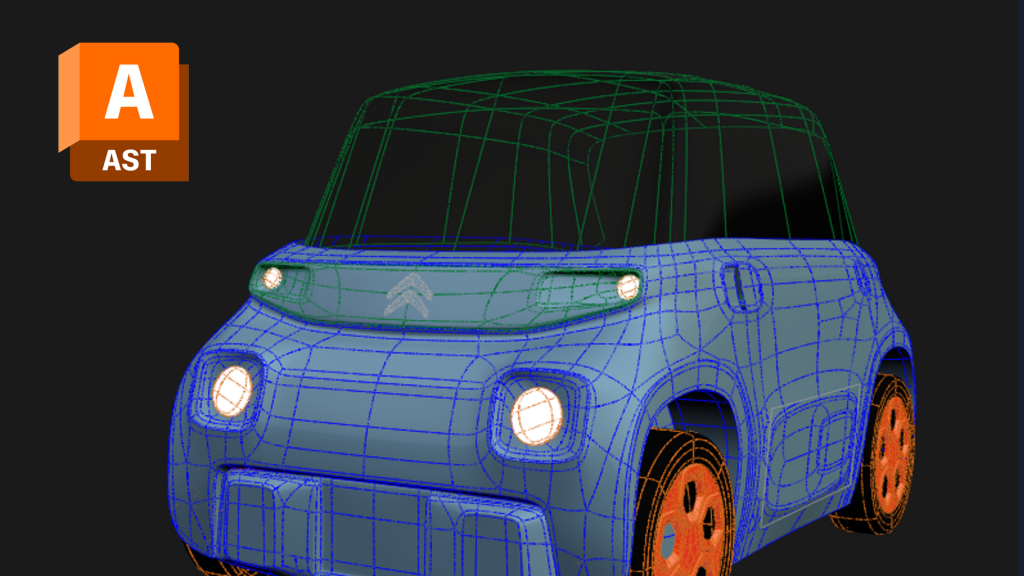
What is Autodesk Alias?
Autodesk Alias is professional surface modelling software widely used in Automotive and Industrial Design. It is designed for developing high-quality Class-A surfaces and provides tools for everything from concept development to detailed surface refinement. Alias can also connect directly to VRED for immersive VR and XR Design Reviews.
Autodesk Alias for Automotive Designers
Surfacing is where small changes can have a major effect on how a vehicle looks in three dimensions. Alias now makes it possible to launch a VR or XR session directly from the Design environment, allowing Designers to evaluate their surfaces at scale rather than relying solely on a monitor. That makes immersive review part of the surfacing process itself, rather than something reserved for the end of the workflow.
A digital model can look very different once you experience it at full scale. VR and real-time visualisation tools make it possible to evaluate vehicles, materials and environments more naturally, long before a physical prototype exists.
These are the best VR tools for Design Review & Visualisation in Automotive Design:
What is Autodesk VRED?
Autodesk VRED is a professional 3D visualisation and virtual prototyping platform used to explore, present and validate digital designs. It supports high-quality rendering, real-time visualisation and collaboration across desktop, VR and mixed reality environments. VRED is particularly established in Automotive Design and visualisation workflows.
Autodesk VRED for Automotive Designers
A vehicle can look very different when experienced at full scale compared with viewing it on a screen. VRED allows Design teams to inspect digital vehicles in immersive environments, making it easier to evaluate proportions, surfaces, materials and overall visual impact. It also makes remote Design Reviews possible, allowing teams in different locations to assess the same digital model without needing a physical prototype.
What is Unreal Engine?
Unreal Engine is a real-time 3D platform used to create interactive visualisations, digital environments and immersive experiences. Originally known for Games and interactive media, it has become an important tool across Automotive Design for real-time visualisation, HMI development, digital twins and interactive vehicle experiences.
Unreal Engine for Automotive Designers
Where traditional rendering focuses on creating a visual output, Unreal Engine allows Designers to experience and interact with a complete digital environment. This makes it useful for evaluating vehicles in realistic surroundings, developing immersive Design Reviews and exploring how a vehicle, its HMI and its environment work together. It can also connect vehicle Design with wider areas of Mobility Design, from digital twins to interactive configurators.
The software is only one part of the equation. The headset you use can have a significant impact on what is possible, and how easy it is to integrate VR into an existing workflow.
This is the best VR hardware in Automotive Design:

What is Meta Quest 3?
Meta Quest 3 is a standalone mixed reality headset designed to combine virtual and physical environments. It offers full-colour passthrough, depth sensing and hand tracking without requiring external tracking hardware, making it one of the more accessible ways to get started with VR and MR.
Meta Quest 3 for Automotive Designers
Not every VR application needs a high-end professional headset. Quest 3 provides a relatively accessible entry point for Designers who want to experiment with immersive sketching, concept presentation or mixed reality without building a complex setup. Its standalone format also makes it practical for workshops, training and quick Design Reviews.
What is Apple Vision Pro?
Apple Vision Pro is a spatial computing device that combines digital content with the physical environment. Instead of simply placing the user inside a fully virtual world, it creates a spatial workspace where 3D content can be viewed, manipulated and shared alongside the real world.
Apple Vision Pro for Automotive Designers
The high-resolution display and spatial interaction make Vision Pro particularly interesting for Design Reviews and collaboration. Apple itself highlights Automotive applications, including Porsche examples where teams use the device to visualise and interact with vehicle-related data and 3D content. It is therefore less about replacing established modelling software and more about creating a different way to experience, review and communicate digital Design.
What is Varjo XR-4?
The Varjo XR-4 is a professional mixed reality headset designed for high-fidelity immersive applications. It combines high-resolution displays with high-quality passthrough, eye tracking, inside-out tracking and depth sensing. The XR-4 series is built for professional applications where visual accuracy and realistic interaction are critical.
Varjo XR-4 for Automotive Designers
For Automotive Design, visual fidelity matters. Small differences in surfaces, proportions, materials or lighting can change how a vehicle is perceived, which makes a high-resolution headset valuable for detailed Design Reviews and virtual prototyping. Varjo specifically positions its XR solutions for Automotive workflows, including virtual prototyping, remote Design reviews and reducing reliance on physical models.
The interesting question is no longer whether VR can be used in Automotive Design. The technology is already being used across concept development, modelling, visualisation and review.
The more useful question is where it genuinely improves the Design process.
VR is particularly valuable when Designers need to understand something that is difficult to judge on a flat screen: scale, proportion, spatial relationships, surfaces and the experience of being inside or around a vehicle. It can also make Design Reviews more direct by giving teams a shared three-dimensional reference instead of asking everyone to interpret screenshots or separate views.
But VR does not automatically make a workflow better. The strongest setups are usually the ones that integrate immersive tools into an existing process rather than treating VR as a separate stage.
Knowing which tools exist is only the first step. Getting the most out of them requires understanding where they fit into the design process and how to integrate them into your daily workflow.
At Haus of Learning, we offer hands-on courses in the digital tools shaping the future of Automotive Design, including a list of VR courses such as Unreal 5 | Automotive Advanced Modules.
Built specifically for automotive and mobility designers, by automotive and mobility designers.
Check out the list of the best AI tools for Automotive Designers.
Sign up to your regular dose of everything Mobility Design:
deep insights, practical tips, and news on upcoming events.